
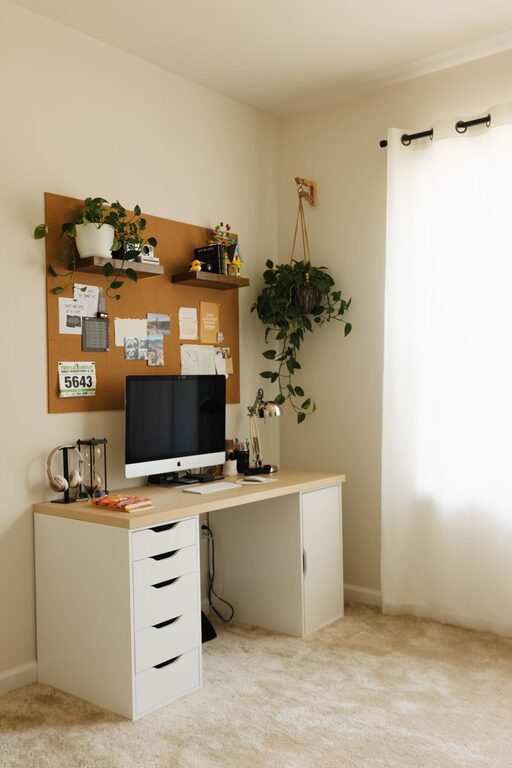
A workspace does not need a complete makeover to feel better. In just ten minutes, you can clear visual clutter, improve your comfort and create a more welcoming place to work.
The key is to keep the refresh simple and time-limited. You are not aiming for a perfect office or a deep clean. Instead, focus on the small changes that make the biggest difference to how your workspace looks and feels.
Start with a quick reset
Before you begin, set a timer for ten minutes. A time limit helps you make quick decisions and prevents the task from becoming a larger project.
You will need:
– A rubbish bin or recycling container
– A small box or bag for items that belong elsewhere
– A cloth or cleaning wipe
– A notebook or piece of paper
– A timer
If your workspace includes shelves, drawers or several surfaces, choose one main area to refresh. This could be your desk, a kitchen table used for work or a small study nook.
Minute one: Clear the obvious clutter
Begin by removing anything that does not belong on your work surface. Empty cups, food wrappers, old notes and packaging can quickly make a workspace feel untidy.
Use three simple categories:
- **Keep:** Items you use regularly during work
- **Move:** Items that belong somewhere else
- **Remove:** Rubbish, recycling or things you no longer need
Do not spend too much time deciding where every item should go. Place things that belong elsewhere in your box or bag, then put them away after the ten-minute refresh.
Keep only the items that support your current work. A clear surface gives you more room to write, use your computer or organise documents.
Minute three: Clean the main surfaces
Once the obvious clutter is gone, wipe down the areas you touch most often. This usually includes:
– Your desk or table
– Keyboard and mouse
– Phone
– Desk lamp
– Chair arms
– Frequently used stationery
Use a suitable cloth or cleaning product for each surface. For electronic equipment, follow the manufacturer’s care instructions and avoid applying liquid directly to the device.
You do not need to clean every corner. A quick wipe of the main surfaces can make the whole workspace feel fresher. It also gives you a clean foundation for the next step.
Minute five: Improve your layout
Now look at how your workspace is arranged. Ask yourself whether the items you use most are easy to reach.
Place your most-used items within comfortable reach, such as:
– Your keyboard and mouse
– A notebook
– Pens
– Headphones
– A water bottle
– A desk lamp or task light
Move less frequently used items to a drawer, shelf or nearby storage area. This reduces distractions and leaves more open space in front of you.
If you use a computer, position the screen so you can look straight ahead without twisting your neck. Your keyboard and mouse should be close enough that your shoulders can remain relaxed. Small adjustments like these can make your workspace more comfortable during the day.
Minute seven: Choose one useful focus tool
A workspace can look neat and still feel distracting. Add one simple tool that helps you focus.
You could use:
– A short to-do list
– A written reminder of your main task
– A small notepad for quick thoughts
– A calendar
– A timer for focused work periods
Keep the tool visible but not overwhelming. A short list of three priorities is often more useful than a long list of everything you need to do.
Write down the most important task for your next work period. Then add one or two smaller tasks if needed. This gives your refreshed workspace a clear purpose and makes it easier to get started.
Minute eight: Add one positive detail
A workspace should be practical, but it can also feel pleasant. Add one item that makes you happy or helps the area feel more personal.
Consider:
– A small plant
– A favourite mug
– A framed photo
– A colourful notebook
– A simple piece of artwork
– A soft desk mat
– A scent-free decorative item
Choose just one detail. Too many decorations can quickly become visual clutter, especially on a small desk.
If you share your workspace with others, select an item that does not take up much room or interfere with other activities.
Minute nine: Check comfort and light
Take a brief look at your chair, screen and lighting. You do not need to redesign the entire setup, but a few quick changes can make a noticeable difference.
Try these checks:
– Is your chair at a comfortable height?
– Are your feet supported?
– Is the screen free from strong glare?
– Is the room bright enough for the task?
– Can you reach your essential items without stretching?
– Are cables creating a trip hazard or crowding the desk?
Open a curtain or adjust a lamp if the space is too dark. Move a light source if it creates reflections on your screen. If cables are messy, gather them loosely with a reusable cable tie or place them behind the desk.
Minute ten: Finish with a simple routine
Use the final minute to look at your workspace as a whole. Remove anything you missed and return the items in your box or bag to their proper places.
Then choose one habit to maintain the refreshed space. For example:
– Clear your desk at the end of each workday
– Return stationery after using it
– Keep a small rubbish bin nearby
– Limit the number of items kept on the desk
– Spend two minutes resetting the area before finishing
A workspace stays refreshed when the reset is easy to repeat. You do not need to wait until the area becomes completely cluttered. A short daily tidy can prevent small messes from becoming distracting.
If you have more than ten minutes
A ten-minute refresh is enough for a quick improvement, but you can build on it later if you have more time. Choose one extra project rather than attempting everything at once.
Organise one drawer
Remove items you no longer use and group the rest into simple categories. Keep frequently used items near the front.
Manage digital clutter
Delete old files from your desktop, close unused browser tabs and place documents into clearly named folders. A tidy digital workspace can be just as helpful as a tidy physical one.
Review your supplies
Check whether you have enough paper, pens and other essentials. Move spare supplies into one storage area so they are easy to find.
Improve your background
If you take online meetings, check what appears behind you. Remove distracting items and make sure the area looks tidy without needing a major redesign.
A small reset can make a big difference
Refreshing your workspace in ten minutes is not about creating a picture-perfect office. It is about removing distractions, making useful items easier to reach and creating a space that supports your next task.
When your workspace feels crowded, start with the basics: clear, clean, arrange and personalise. With a short timer and a few simple decisions, you can create a calmer and more practical place to work before the day gets underway.